
Need a laptop battery replacement in Australia? Learn the warning signs, how to match the right part number, and where to buy a reliable, warranty-backed pack locally.
Every laptop battery begins to fade eventually. If you are searching for laptop battery replacement in Australia, you have probably already noticed the warning signs: the charge drops within minutes of unplugging, the low-battery icon appears even at forty percent, or the shut-downs arrive without warning. A failing battery does not mean the end of your laptop. A quality replacement restores the portability that made you buy the machine in the first place.
Why Laptop Batteries Lose Their Capacity
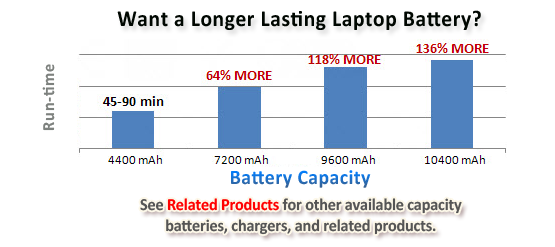
Lithium-ion cells are consumable parts. Every charge cycle causes a small amount of chemical wear, and heat speeds the process dramatically. Australian conditions make this worse, because leaving a notebook in a hot car or charging it in direct summer sun pushes cells beyond their comfortable range. After roughly 3 to 5 hundred full cycles, most packs deliver only a fraction of their original runtime. Age matters as much as use, so a laptop spent two years on a desk can still need a new battery.
Signs You Need a Laptop Battery Replacement
Runtime and Charging Problems
The clearest signal is a battery that drains quickly or refuses to reach one hundred percent. If your laptop only works while plugged in, or the percentage jumps unpredictably, the cells are no longer holding a stable charge.
Physical and System Warnings
Swelling, a bulging trackpad, unusual heat, or a battery not detected message all deserve immediate attention. A swollen pack should be replaced and recycled responsibly rather than ignored.
Finding the Right Battery in Australia
Compatibility is the first priority. Batteries are identified by part number, not just by laptop brand, so match the code printed on your original pack. For example, owners of older Acer Aspire models can choose an Acer AS10D51 battery replacement that also covers AS10D31 variants, while Dell Inspiron 17 users often need the Dell 33YDH battery. Checking the part number prevents costly returns and saves time. Voltage and capacity should also match the original specifications, a mismatch can trigger error messages or shorten the life of cells. Reputable listings show both numbers clearly before you buy.
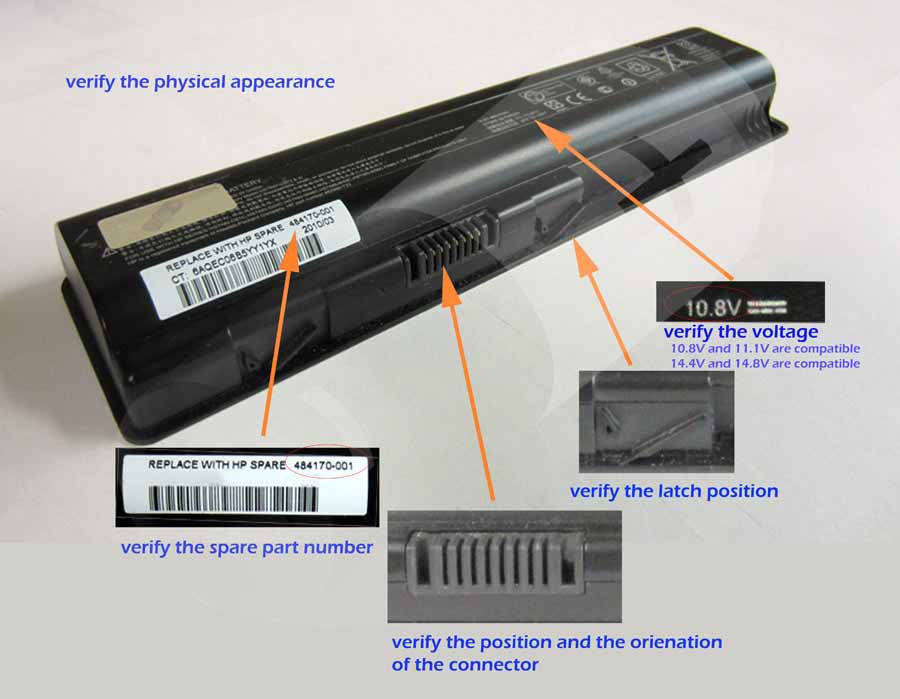 5 things to verify before you buy: physical appearance, spare part number, voltage, latch position, and the position and orientation of the connector
Why Buy From an Australian Battery Specialist
Ordering locally shortens delivery time and gives you real support when a compatibility question comes up. A dedicated battery store tests each pack, confirms capacity and voltage, and lists exactly which models it fits. Buying the cheapest cell from an unknown marketplace seller can mean weak runtime, poor contacts, or no warranty at all. Local stock also means easier returns and advice from people who handle notebook batteries every day.
Getting More Life From Your New Notebook Battery
Once fitted, avoid letting the charge fall to zero regularly; top up around twenty percent instead. Keep the laptop ventilated, unplug the charger when it reaches full, and store the machine in a cool place. A few simple habits can add hundreds of cycles. If you plan to store the laptop for several weeks, leave the battery around half charge rather than completely full or empty, and check it from time to time.
Browse the laptop battery range at Aussie Battery Store, match your part number, and enjoy free Australian Post shipping on replacement laptop batteries. Restore your laptop’s freedom with a replacement built to keep you moving.